Palworldless than a minute read
How To Install Mods On Your Palworld Server
Learn to install mods on your Palworld server with this easy step-by-step guide. Enhance your gameplay today! Read the article for detailed instructions.

Many players search for how to install mods on your Palworld server because mods can completely transform the game by adding new features, improving quality of life, rebalancing gameplay, or introducing entirely new mechanics. Whether you're hosting a dedicated server or a private server for friends, install mods to customize your Palworld server with server-side mods or PAK mods, making every adventure feel fresh. From small tweaks to major overhauls, mods installed correctly can create a more unique and enjoyable experience while keeping your server tailored to the way you want to play.
NOTE: This guide is only for Palworld Pak mods, as that is this type of mod is supported on our Palworld Server Hosting services.
To Add Mods
- Download the desired mods from CurseForge or Nexus Mods.
You will either have a .pak file installed or a zip file that contains the .pak file.
-
Access the RocketNode panel.
-
Stop the server.
-
Open the Files tab.
-
Navigate to the following directory: `Pal/Content/Paks`
-
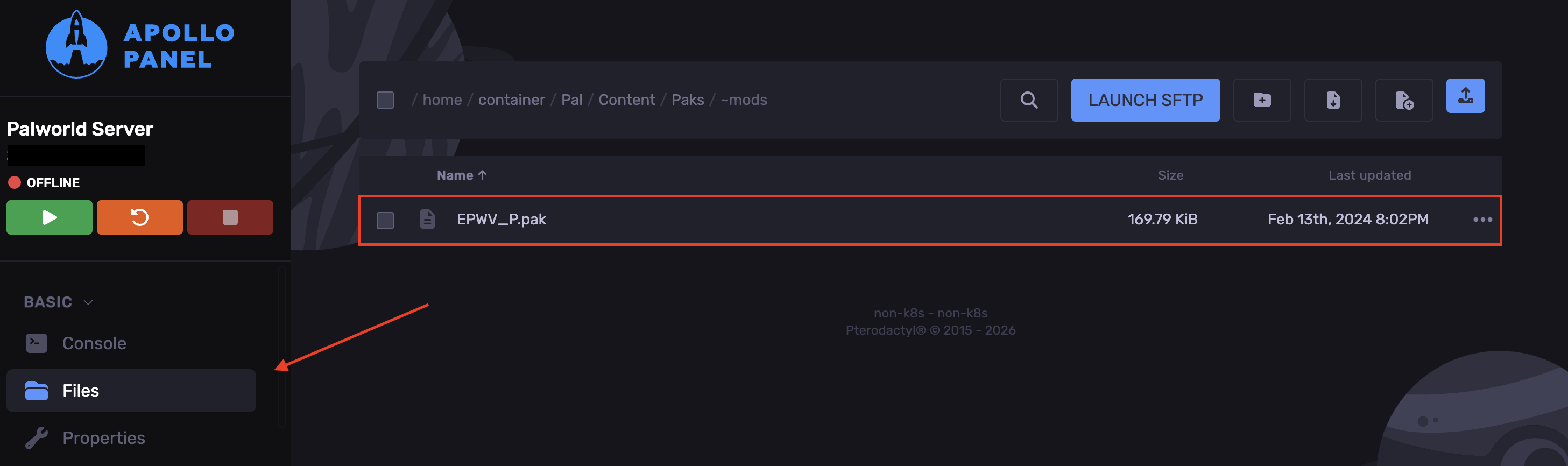
Create a folder named `~mods`
-
Upload the .pak mod files inside the `~mods` folder.
-
Start the server.