

 Garry's Modless than a minute read
How to Make your Garry's Mod Server Private
Stop letting unwanted people join your server.

RocketNode Staff
If you're setting up a Garry's Mod server for you and a handful of friends, you might prefer to keep it private to prevent unauthorized players from joining. This guide will introduce an effective strategy for securing your Garry’s Mod server, ensuring that only players with your explicit permission can access it.
Adding A Password For Your Server
- Go to your Garry’s Mod Server Panel and make sure the server is off.
- Navigate to File Manager > garrysmod > cfg.
- Open server.cfg
- Locate sv_password and type enter a secure password.
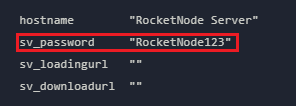
- Save and Close the document.
- Turn the server ON.
Connecting To The Server
Since the server now has a password, the process of connecting to it is different.
- Start Garry’s Mod and open the Developer Console. If you do not know how to do that, please read this article on How to Enable the In-Game Console on Your Garry's Mod Client
- Type
connect ip:port; password passwordhere, as in the example, and pressEnteron your keyboard. - You are now connecting to your server.
Find out more about Garry’s Mod server hosting with the help of our Knowledgebase articles that can be found here. For any questions please contact the support team via Discord or on-site Tickets.
