

 Garry's Modless than a minute read
How to Enable the In-Game Console on Your Garry's Mod Client
If you have trouble opening the in-game console, this is the right tutorial for you.

RocketNode Staff
Activating the console in Garry’s Mod is a beneficial feature for players who wish to implement cheat codes or execute administrative commands, offering a powerful means of customizing gameplay and managing the game environment.
NOTE: If the console does not open just by pressing ~ on your keyboard, it means that either you need to change the keybind or reset it.
Changing the Developer Console Bind
- In the Main Menu, go to Options.
- Navigate to Keyboard and scroll to the button where the
Toggle Developer Consolebind will be found.
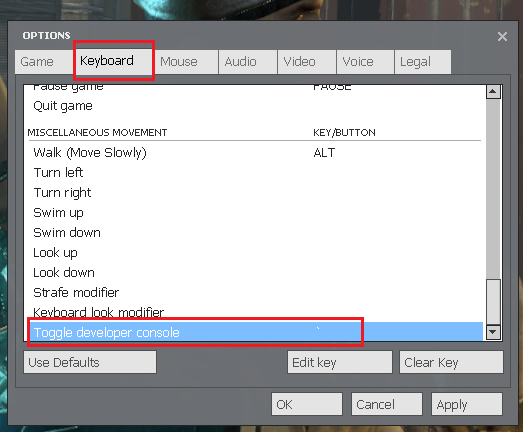
- Click on it and press Edit key.
- Press on whatever key you want to put the console on.
- Press Apply and Ok.
Find out more about Garry’s Mod server hosting with the help of our Knowledgebase articles that can be found here. For any questions please contact the support team via Discord or on-site Tickets.
