FiveMless than a minute read
How to Change FiveM Server Region, Language & Tags
Learn how to change your FiveM server's region, language, and tags in server.cfg so the right players can find your server in the server list.

How to Change FiveM Server Region, Language & Tags
If you're wondering how to change FiveM server region, the region, language, and tags help define how a FiveM server appears to players and make it easier for the right community to find it. The server list can display information such as the country flag, language or locale, and tags like roleplay or ESX, giving players a quick idea of the server's community, location, and gameplay style.
Changing the Region & Language
-
Open the RocketNode Panel.
-
Stop the server.
-
Go to the Files tab.
-
Open the
server.cfgfile. -
Find the line
sets locale. -
Adjust the line as desired:
sets locale "language-REGION". For example, to set the country flag to Germany and the language to German, usesets locale "de-DE".
-
Click Save Content.
-
Start the server.
Find a list of the language/country codes here.
Changing the Server Tags
-
Open the RocketNode Panel.
-
Stop the server.
-
Go to the Files tab.
-
Open the
server.cfgfile. -
Find the line
sets tags "default". -
Adjust the tag as desired. Between each tag, you must add a comma and a space, as shown in the example below:
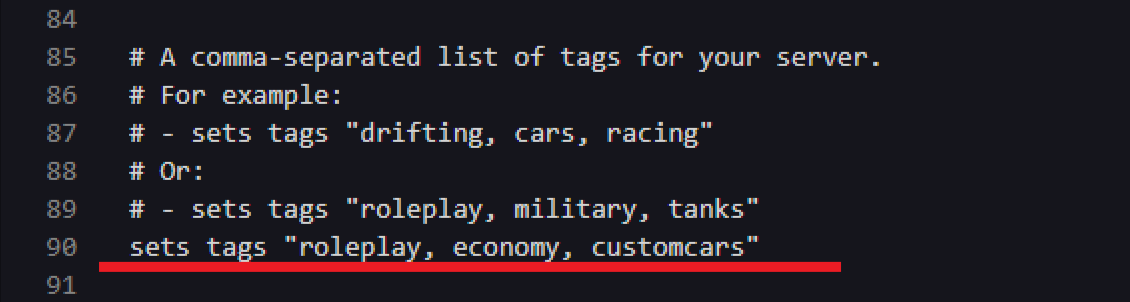
-
Click Save Content.
-
Start the server.
Find out more about FiveM server hosting with the help of our Knowledgebase articles that can be found here. For any questions please contact the support team via Discord or on-site Tickets.