

 Arma 3less than a minute read
How to Join your ARMA 3 Server
Connecting to your server will be easier than ever with this tutorial.

RocketNode Staff
After setting up your Arma 3 server to your satisfaction, you're all set to join it. To do so, we advise employing the direct connection approach via the Arma 3 launcher for a seamless entry.
Getting the Server’s IP
- Go to your Arma 3 Server Panel and make sure the server is on.
- Go to Console and copy the IP address found there.

Connecting To The Server
- Launch Arma 3 and click Servers
- Click Direct Connect
- Paste the server’s IP address and the port. If the server has a password set, also type that one.
- Click Connect
Connecting Through Steam
- Copy your server’s address.
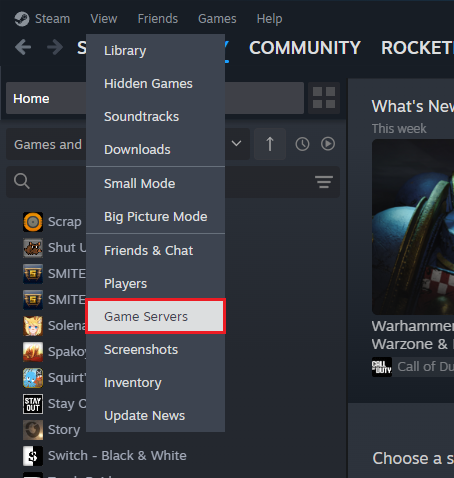
- Go to your Steam Client and at the top left press on View > Game Server
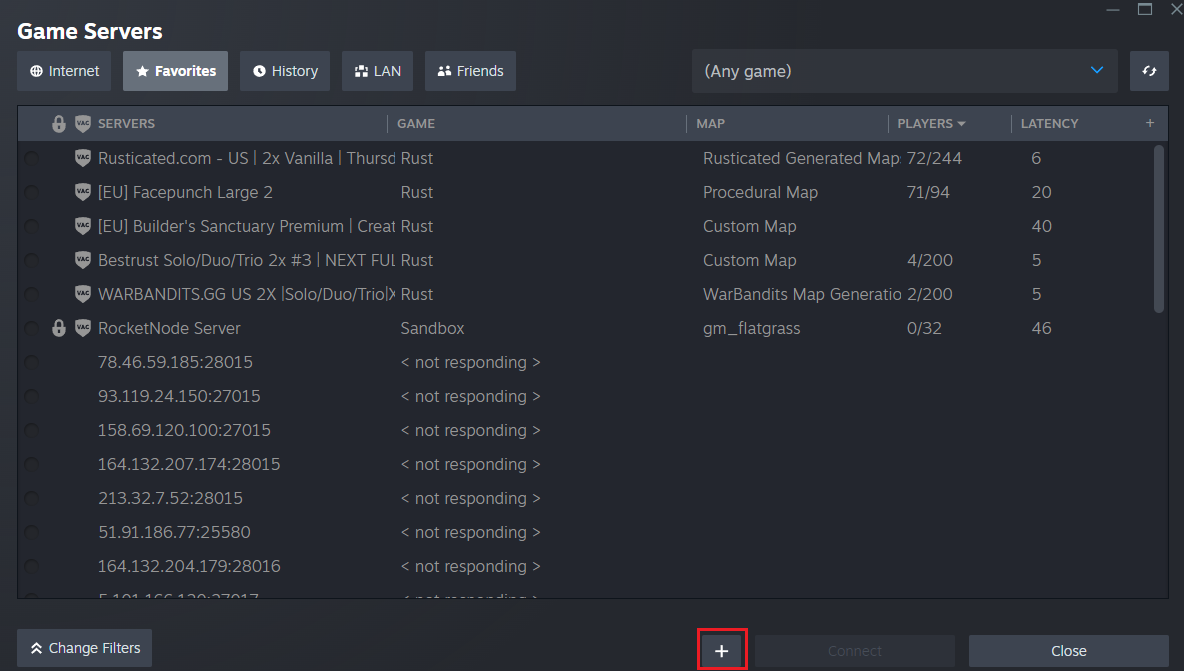
- Click on the Favorites tab and than on the
+button.
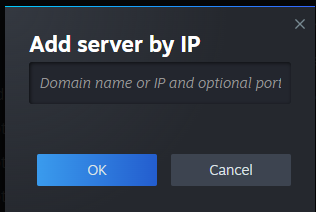
- Paste the IP:Port in the window opened. and click OK.
- Look through the list and click on your server to connect.
Find out more about Arma 3 server hosting with the help of our Knowledgebase articles that can be found here. For any questions please contact the support team via Discord or on-site Tickets.
