

 Account and Billingless than a minute read
How to Change your Billing Account’s Password
Find out how to reset the password of your billing account.

RocketNode Staff
In this tutorial, you will learn how to change the password for your Rocketnode billing account, with step-by-step instructions. By doing so, you are ensuring your account remains secure and up-to-date.
-
Go to Rocketnode Billing
-
Log in with your billing account credentials.
-
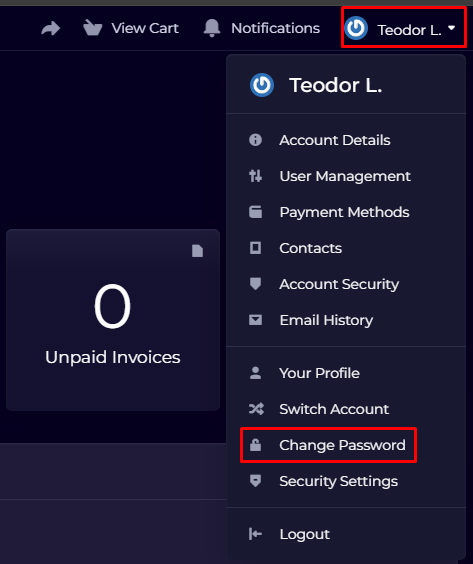
Navigate to the top right and select "Change Password.”
-
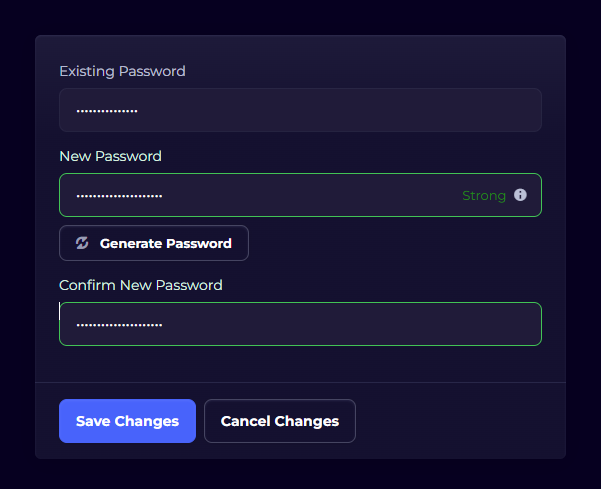
Enter your current password and then the new password.
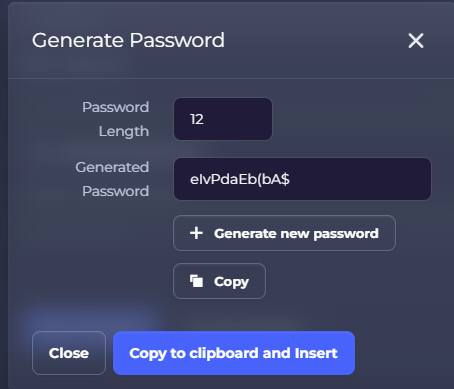
NOTE: If you need assistance creating a password, you can use the "Generate Password" feature for a secure suggestion.
- Press "Save Changes.”
Find out more about server hosting with the help of our Knowledgebase articles that can be found here. For any questions please contact the support team via Discord or on-site Tickets.
