How to Install QBCore on FiveM
 RocketNode Staff
Want to install QBCore or Qbox on your FiveM server? This guide explains how to set up both frameworks using txAdmin, including database configuration, server setup, server.cfg settings, framework selection, compatibility, and common troubleshooting.
QBCore is one of the most established open-source frameworks for FiveM roleplay servers. It provides systems for jobs, gangs, player management, inventory, housing, phones, HUDs, character management, and more.
Qbox is a newer framework that originated as a QBCore fork and was designed to improve code quality, security, performance, and integration with modern FiveM resources while maintaining compatibility with most QBCore scripts.
Both frameworks can be used to build a complete FiveM roleplay server, but they have different approaches and requirements.
QBCore vs. Qbox
Before installing anything, it is worth understanding the difference between QBCore and Qbox.
Qbox started as a fork of QBCore and has evolved into its own framework. Its core resource, qbx_core, is designed around modern APIs, exports, improved resource architecture, and integration with resources from the Overextended ecosystem.
QBCore
QBCore is a mature FiveM roleplay framework with a large ecosystem of scripts and resources.
It is commonly used for servers that need:
- Jobs and job management.
- Gangs.
- Player and character systems.
- Housing.
- Inventory systems.
- Vehicles.
- Banking.
- Shops.
- Police and emergency services.
- Custom roleplay resources.
- A large selection of community scripts.
Its long history means there are many QBCore-compatible resources available.
Qbox
Qbox is designed as a more modern successor to the QBCore architecture.
Some of its notable features include:
- A modern qbx_core.
- Backwards compatibility with most QBCore resources.
- Built-in multicharacter support.
- Built-in multi-job and gang support.
- Persistent player vehicles.
- A queue system for full servers.
- Export-based APIs.
- Integration with modern resources such as ox_lib and ox_inventory.
- A focus on performance and security.
- A modular resource structure.
- Continued development through the Qbox Project.
Qbox's official documentation states that most properly written QBCore scripts can continue to work through its compatibility bridge. However, scripts that directly access undocumented QBCore internals, database tables, or unsupported functions may require modifications.
Which Framework Should You Choose?
There is no single answer for every server.
Choose QBCore if:
- You already have a QBCore server.
- You rely heavily on older QBCore resources.
- You have developers experienced with QBCore.
- You want to use a large existing QBCore ecosystem.
- You do not want to migrate an existing server.
Choose Qbox if:
- You are starting a new FiveM server.
- You want a more modern framework architecture.
- You want stronger integration with modern resources.
- You want to use ox_lib and ox_inventory.
- You want access to Qbox's built-in systems.
- You are comfortable with a framework that differs from traditional QBCore development.
- You want to migrate from QBCore while retaining compatibility with many existing resources.
The official Qbox documentation specifically recommends Qbox for both existing QBCore servers and servers that are planning to use QBCore in the future.
Prerequisites
Before installing QBCore or Qbox, make sure you have:
- A FiveM server: Windows or Linux.
- A compatible database: QBCore commonly uses MySQL-compatible databases, while Qbox's current installation documentation specifically targets MariaDB.
- A Cfx.re account and license key.
- Updated FiveM server artifacts.
- txAdmin: Recommended for both QBCore and Qbox installations.
- Sufficient server resources: CPU, RAM, and storage appropriate for the number of players and resources you plan to run.
Database Requirements
Your database requirements depend on which framework you choose.
QBCore Database
QBCore servers commonly use MySQL or MariaDB together with oxmysql.
The exact database requirements can vary depending on the QBCore version and resources installed on your server.
Qbox Database
Qbox has more specific requirements.
The current Qbox installation documentation states that MariaDB is required, with MariaDB 10.9.0 as the minimum supported version. For new installations, Qbox currently recommends MariaDB 12.3 LTS.
Qbox relies on database features that require a sufficiently recent MariaDB release, including JSON functions and idempotent index creation.
Important: Qbox's official documentation explicitly states that XAMPP is not supported. Do not use XAMPP as your database solution for a Qbox production server.
XAMPP: Should You Use It?
For a local development environment, XAMPP can be convenient because it packages several services together.
However, it is not recommended for a real production FiveM server.
For Qbox, the recommendation is even stronger: its official installation documentation states that XAMPP should not be used and expects MariaDB to be installed separately.
For a production VPS, use:
- MariaDB.
- Proper database credentials.
- Firewall rules.
- Regular backups.
- A database management tool such as phpMyAdmin if you need a graphical interface.
You can also use other database management applications instead of phpMyAdmin.
VPS vs. Managed FiveM Hosting
Your database setup depends heavily on where your server is hosted.
Localhost
A local installation is useful for:
- Development.
- Testing scripts.
- Learning FiveM server administration.
- Building a server before renting hosting.
For Qbox, install a supported version of MariaDB instead of relying on XAMPP.
VPS
A VPS gives you complete control over your environment.
A typical production setup may include:
VPS
├── FiveM Server
├── txAdmin
├── MariaDB
├── QBCore or Qbox
├── oxmysql / required database resources
├── Firewall
└── Backups
If you choose Qbox, make sure your MariaDB version meets its current requirements.
Managed FiveM Hosting
If you use a reputable FiveM hosting provider, you normally do not need to manually install MariaDB.
Many providers offer:
- A preconfigured database.
- Database credentials.
- phpMyAdmin or another database manager.
- Server backups.
- A control panel.
- File management.
- Automated server installation.
- Technical support.
In this situation, simply use the database credentials supplied by your host.
Get Your Cfx.re License Key
FiveM server license keys are managed through the https://portal.cfx.re/ Portal.
Sign in with your Cfx.re account and create or manage the license key required by your server.
Important: If an older FiveM guide tells you to use keymaster.fivem.net, the guide is outdated. The current license management system uses the Cfx.re Portal.
Installing QBCore With txAdmin
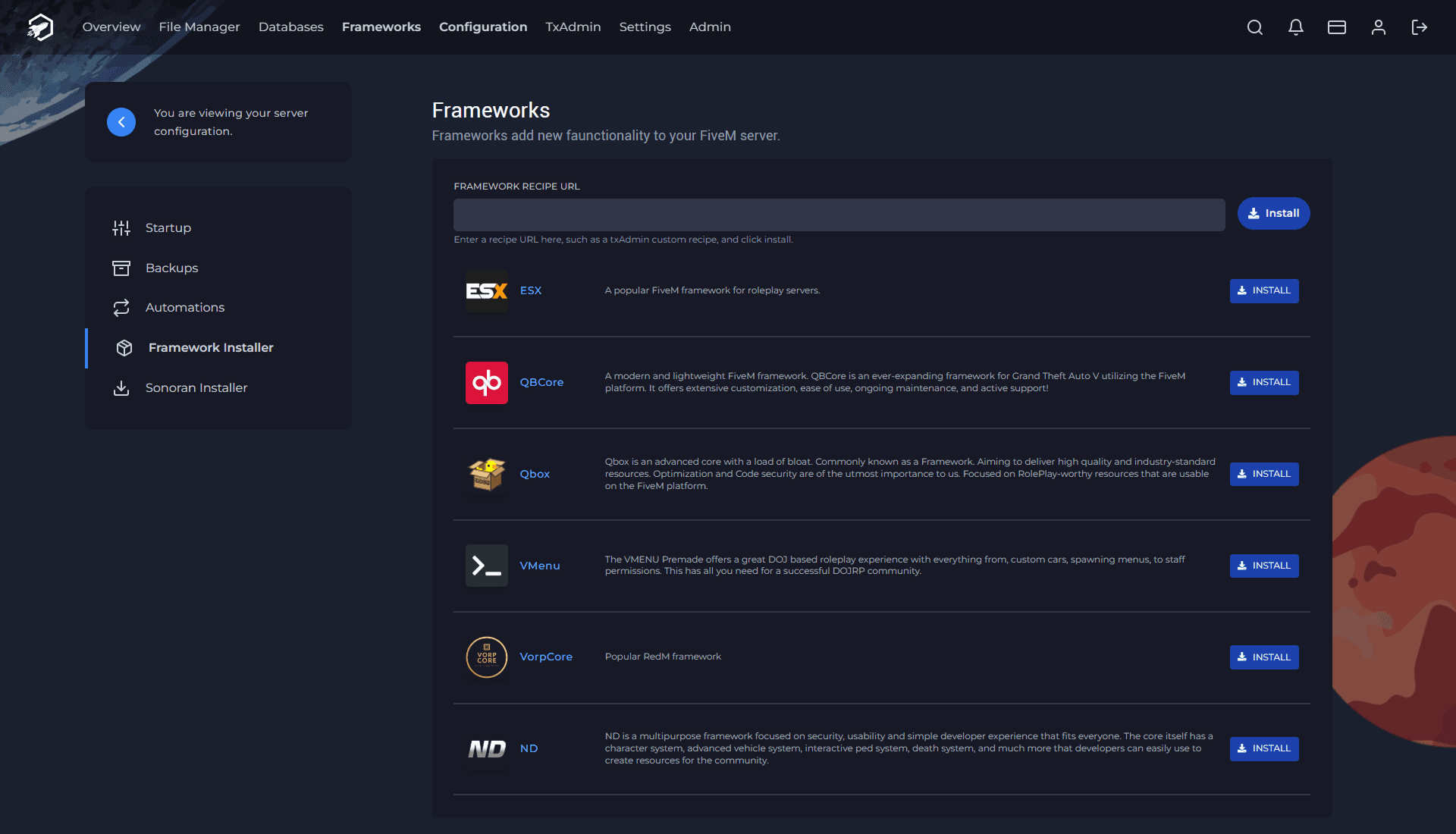
The recommended way to install QBCore is through the txAdmin recipe system.
Step 1: Open txAdmin
Start your FiveM server and open txAdmin.
If this is a new installation, txAdmin will guide you through the initial configuration.
Select the QBCore recipe from the available deployment options.
Step 2: Configure the Database
Enter your database connection information.
A typical connection string may look like:
mysql://dbuser:[email protected]:3306/dbname?charset=utf8mb4
Replace:
- dbuser with your database username.
- dbpassword with your database password.
- dbname with your database name.
- 127.0.0.1 with your database host.
- 3306 with your database port.
If you use managed hosting, use the credentials supplied by your hosting provider.
Step 3: Run the Recipe
txAdmin will download and configure the resources included in the selected recipe.
Depending on the recipe version, this can include:
- qb-core.
- oxmysql.
- QBCore resources.
- Jobs.
- Gangs.
- Inventory.
- Housing.
- Voice resources.
- Standalone dependencies.
- Default FiveM resources.
- Database files.
- server.cfg.
The exact resources can change over time, so do not rely on a fixed resource count.
Step 4: Add Your License Key
Make sure your server.cfg contains your Cfx.re license key:
sv_licenseKey "YOUR_CFX_LICENSE_KEY"
Replace the placeholder with the key generated through the Cfx.re Portal.
Step 5: Start the Server
Start the server through txAdmin.
Watch the console while the resources are loading.
A successful installation should start the framework and its dependencies without critical errors.
Installing Qbox on FiveM
If you are starting a new server, Qbox is an alternative to QBCore that is worth considering.
The official Qbox documentation recommends installing Qbox through its txAdmin recipe rather than manually assembling the framework.
Step 1: Install FiveM Server Artifacts
Download the latest FiveM server artifacts and extract them.
On Windows, run:
FXServer.exe
This will start the txAdmin setup process.
Qbox recommends using txAdmin for installation.
Step 2: Open txAdmin
Complete the initial txAdmin setup.
When you reach the deployment options, choose the Qbox recipe.
The current txAdmin recipe list includes Qbox alongside QBCore and other FiveM frameworks. The official Qbox recipe is maintained by the Qbox Project.
Step 3: Select the Qbox Recipe
The Qbox project provides different recipe options, including:
- Qbox Stable
- Qbox Lean
- Qbox Unstable
The Stable recipe is intended for users who want a more conservative and production-oriented setup, while other recipes can provide different selections of resources depending on your needs.
For a production server, carefully review which recipe you are deploying before starting the installation.
Step 4: Configure MariaDB
Qbox expects MariaDB to be installed before deployment.
The current official requirements are:
- Minimum: MariaDB 10.9.0.
- Recommended for new installations: MariaDB 12.3 LTS.
Older supported LTS versions may also work, but new installations should follow the current Qbox documentation.
Do not use XAMPP for Qbox. The Qbox documentation explicitly states that XAMPP is unsupported.
Step 5: Deploy Qbox
Run the recipe through txAdmin.
The recipe installs and configures the core components and resources required for the Qbox environment.
Once installation is complete, start the server and monitor the txAdmin console for errors.
What Is qbx_core?
qbx_core is the core framework resource used by Qbox.
It provides the foundation for player management, jobs, gangs, player data, framework APIs, and other systems.
Qbox's core is designed around exports and modules rather than depending on the traditional QBCore core-object pattern.
Some of the functionality provided by qbx_core includes:
- Player management.
- Jobs.
- Gangs.
- Character data.
- Money.
- Player metadata.
- Persistent vehicles.
- Multicharacter functionality.
- Multi-job support.
- Framework exports.
- Compatibility with many QBCore resources.
Qbox's Built-In Features
One of the biggest advantages of Qbox is that several systems that traditionally required additional resources can be integrated into the framework.
Multicharacter
Qbox includes built-in multicharacter functionality, allowing players to manage multiple characters.
Multi-Job
Qbox supports multiple jobs per player.
This can be useful for roleplay servers where players can maintain several occupations or job roles.
Gangs
Gang management is also integrated into the framework.
Persistent Vehicles
Qbox supports persistent player vehicles as part of its core functionality.
Queue System
Qbox includes a queue system intended to handle servers when they reach capacity.
Qbox and ox_lib
Qbox heavily integrates with the modern FiveM resource ecosystem.
One of the most important dependencies in this ecosystem is ox_lib.
Qbox development guidelines encourage using ox_lib where appropriate, and its developer documentation uses it as a foundation for various utilities and modules.
This gives developers access to modern utilities instead of recreating common functionality in every individual resource.
Qbox and ox_inventory
Qbox is designed to work closely with ox_inventory.
This is an important difference for users coming from older QBCore setups, where inventory systems may be configured differently.
Qbox documentation explains that items and player inventory data can be integrated through the framework and ox_inventory, while resources should use the appropriate exports rather than directly accessing database tables or internal framework data.
If you are converting an existing QBCore server, inventory migration should be planned carefully and backed up before making changes.
Does Qbox Support QBCore Scripts?
Yes, in most cases.
Qbox includes a compatibility bridge designed to support most properly written QBCore resources.
This means you do not necessarily have to replace every QBCore script when moving to Qbox.
However, compatibility is not guaranteed for every resource.
Problems can occur when a script:
- Directly accesses QBCore database tables.
- Reads internal QBCore files.
- Uses undocumented functions.
- Relies on unsupported behavior.
- Stores framework data in its own database tables incorrectly.
- Depends on old QBCore implementation details.
In those situations, the resource may need to be updated or converted.
Converting From QBCore to Qbox
If you already have a QBCore server, you do not necessarily need to start from zero.
Qbox provides documentation specifically for migrating existing QBCore servers.
Before migrating:
1. Create a Full Backup
Back up:
- Server files.
- Database.
- server.cfg.
- Resource configurations.
- Custom scripts.
- Player data.
Never begin a framework migration without a working backup.
2. Update Server Configuration
A Qbox installation uses its own configuration files, including:
server.cfg
ox.cfg
permissions.cfg
voice.cfg
The Qbox recipe can download the required configuration files automatically.
3. Review Jobs and Gangs
Qbox uses numeric job and gang grades, whereas QBCore traditionally uses string values.
Existing job and gang configurations may therefore need to be adjusted during migration.
4. Configure ox_inventory
Inventory migration is an important part of moving from QBCore to Qbox.
Back up the database before modifying inventory data and follow the current Qbox and ox_inventory migration instructions.
5. Test Your Resources
Do not assume that every QBCore resource will work perfectly.
Test:
- Jobs.
- Police scripts.
- EMS scripts.
- Inventory.
- Housing.
- Vehicles.
- Banking.
- Shops.
- Character systems.
- UI resources.
- Custom scripts.
Fix compatibility issues one resource at a time.
QBCore vs. Qbox: Main Differences
| Feature | QBCore | Qbox |
|---|---|---|
| FiveM Roleplay Framework | Yes | Yes |
| Open Source | Yes | Yes |
| QBCore Resource Ecosystem | Excellent | Compatible with most resources |
| Modern Framework Architecture | Traditional | Modernized |
| QBCore Compatibility Layer | N/A | Yes |
| Built-in Multicharacter | Depends on setup | Yes |
| Built-in Multi-Job | Depends on setup | Yes |
| Built-in Gang System | Yes | Yes |
| Persistent Vehicles | Resource-dependent | Built-in support |
| Queue System | Resource-dependent | Built-in |
| ox_lib Integration | Resource-dependent | Strong integration |
| ox_inventory Integration | Optional/common | Core ecosystem |
| MariaDB Requirement | Depends on setup | Yes |
| XAMPP | Not recommended for production | Not supported |
| Migration From QBCore | N/A | Supported |
Important server.cfg Settings
Your server.cfg controls important FiveM server settings.
A QBCore installation may include:
sv_licenseKey "YOUR_CFX_LICENSE_KEY"

sv_enforceGameBuild 3095

set mysql_connection_string "mysql://user:[email protected]:3306/dbname?charset=utf8mb4"

setr voice_useNativeAudio true
setr voice_useSendingRangeOnly true

setr qb_locale "en"
setr UseTarget false

ensure qb-core
ensure [qb]
ensure [standalone]
ensure [voice]
ensure [defaultmaps]
Qbox installations use their own generated configuration files, so do not copy a QBCore server.cfg into a Qbox server without understanding the differences.
Always use the configuration generated by the current Qbox recipe or its official documentation.
Common Qbox Problems
MariaDB Version Is Too Old
If Qbox reports database-related errors, check your MariaDB version first.
Qbox currently requires MariaDB 10.9.0 or newer and recommends MariaDB 12.3 LTS for new installations.
XAMPP Is Not Working
Do not attempt to troubleshoot Qbox by switching between different XAMPP configurations.
Qbox officially does not support XAMPP.
Install MariaDB directly instead.
QBCore Script Does Not Work
First determine whether the script uses supported QBCore APIs.
Most properly written QBCore scripts should work through Qbox's compatibility bridge, but resources that access internal files or database tables directly may require conversion.
Database Tables Are Missing
Verify that:
- MariaDB is running.
- The correct database is being used.
- The Qbox SQL files were installed.
- Your database credentials are correct.
- The resource that owns the table has initialized correctly.
Do not manually modify framework tables unless the documentation for the specific resource instructs you to do so.
Resource Dependency Errors
Check the console for missing dependencies.
Modern Qbox resources may depend on components such as:
ox_lib
ox_inventory
qbx_core
Make sure dependencies are installed and started before the resources that require them.
Performance and Security
Qbox places a strong emphasis on performance and security.
Its development guidelines recommend avoiding unnecessary threads, reducing the frequency of distance-checking loops when players are far away, and not trusting client-side data for sensitive operations such as transactions.
This is particularly important for public FiveM servers.
When installing third-party resources:
- Review their source when possible.
- Avoid outdated scripts.
- Keep dependencies updated.
- Do not expose your database unnecessarily.
- Use strong database passwords.
- Keep regular backups.
- Do not trust client-provided values for important transactions.
- Remove resources you no longer use.
Choosing Between QBCore and Qbox
For a new FiveM server, Qbox is worth considering if you want a modern framework and plan to use resources from the ox ecosystem.
For an existing QBCore server, migrating to Qbox can be practical because of its compatibility bridge, but you should test every important resource before switching your production server.
If your server already has a large collection of custom QBCore scripts that depend heavily on internal QBCore behavior, staying with QBCore may be the simpler option.
Final Thoughts
Both QBCore and Qbox are capable frameworks for building a FiveM roleplay server.
QBCore remains a popular choice because of its mature ecosystem and large selection of community resources. Qbox takes the QBCore foundation in a more modern direction, focusing on performance, security, modularity, and integration with resources such as ox_lib and ox_inventory.
If you are starting a new server, compare both frameworks before committing to your resource ecosystem.
If you already run QBCore, Qbox does not necessarily require a complete rebuild. Its compatibility layer supports most properly written QBCore resources, although scripts that depend on undocumented APIs or direct database access may need to be converted.
For production environments, avoid XAMPP. Qbox specifically requires a supported MariaDB installation, while QBCore deployments should also use a properly configured production database rather than a development-oriented package.
Finally, keep your FiveM artifacts, framework, dependencies, and resources updated, and always make a complete database and server backup before performing major framework migrations.